How to Set Up Parental Controls on Any Device

How to Set Up Parental Controls on Any Device

Post by : Zayd Kamal

Sept. 27, 2024 7:30 p.m. 2450

Do You Know How to Set Parental Controls on a Device?

In today’s digital age, children are exposed to a wide array of online content. While the internet can be a valuable resource for learning and entertainment, it also poses risks that every parent should be aware of. One of the most effective ways to protect your children from inappropriate content and ensure they have a safe online experience is by using parental controls. But do you know how to set parental controls on a device? If not, don’t worry! This guide will walk you through the process for various devices and platforms, making it easy to create a safer digital environment for your kids.

Why Parental Controls Matter

Before diving into the “how-to,” let’s understand why parental controls are essential. With children accessing the internet on various devices, from smartphones to tablets and gaming consoles, the potential for exposure to harmful content is significant. Parental controls help you manage what your children can see and do online, allowing you to:

  • Block Inappropriate Content: You can filter out websites, apps, and content that may not be suitable for your child’s age.
  • Manage Screen Time: Set limits on how long your children can spend on their devices each day.
  • Monitor Activity: Keep track of what your children are doing online, including the apps they use and the websites they visit.
  • Create a Safer Environment: Give your children the freedom to explore the digital world while keeping them protected from potential dangers.

Now that we’ve established the importance of parental controls, let’s explore how to set them up on various devices.
Setting Parental Controls on Smartphones and Tablets

For iOS Devices (iPhone and iPad)

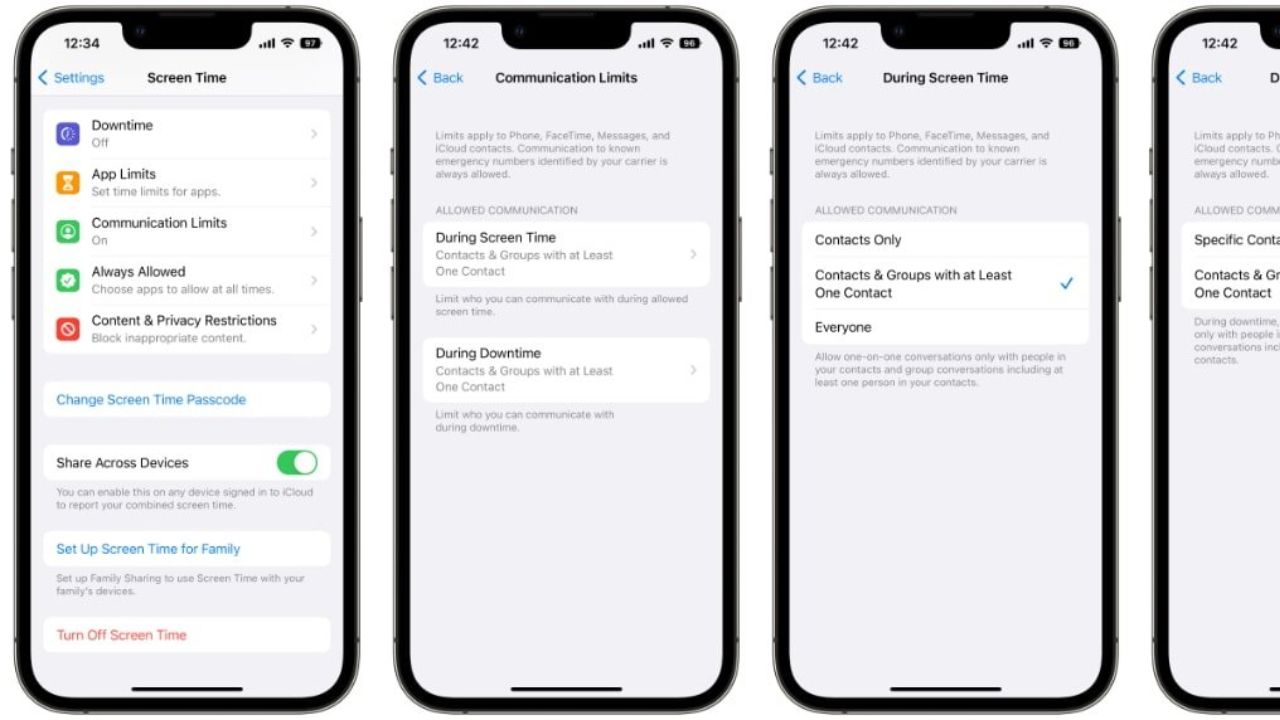
  1. Open Settings: Start by tapping on the "Settings" app on your device.
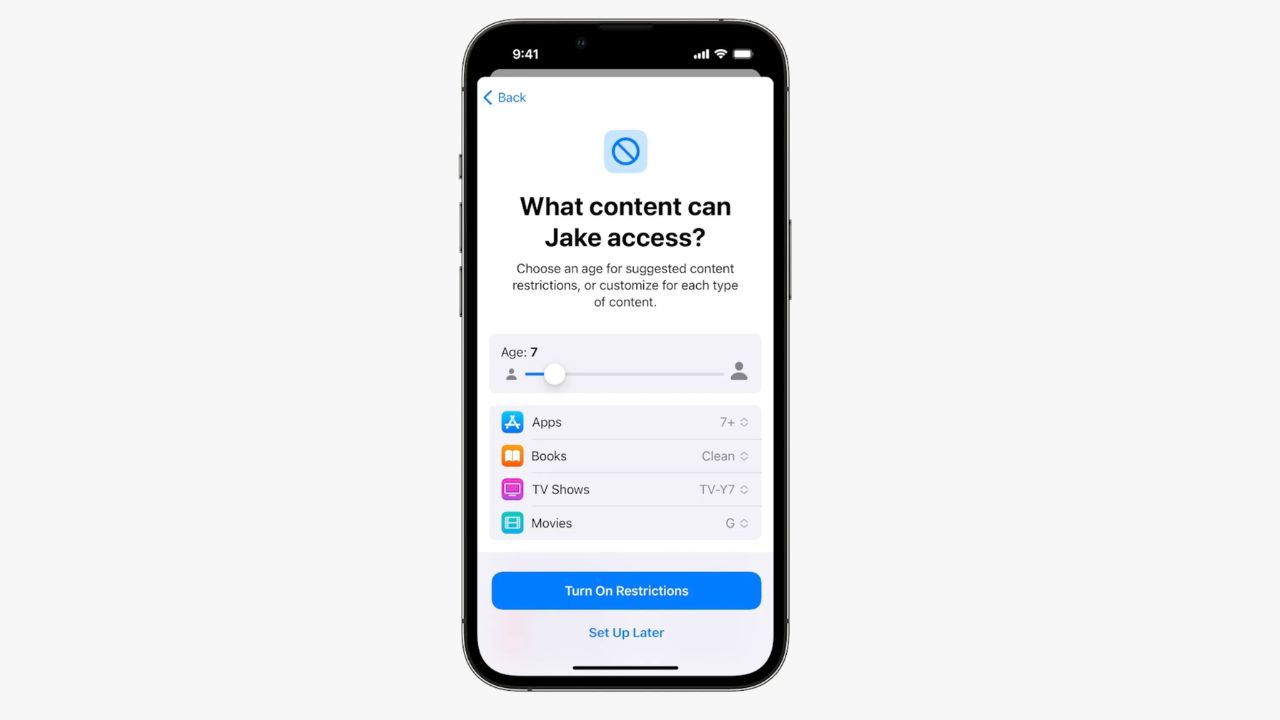
  2. Screen Time: Scroll down and select "Screen Time." If you haven’t set it up yet, tap "Turn On Screen Time" and follow the prompts.
  3. Content & Privacy Restrictions: Tap on "Content & Privacy Restrictions" and enable it by toggling the switch at the top.
  4. Set Restrictions: Here, you can restrict access to certain content types:
    • iTunes & App Store Purchases: Control purchases and downloads.
    • Allowed Apps: Choose which apps can be accessed.
    • Content Restrictions: Set limits on movies, TV shows, apps, and websites based on age ratings.

For Android Devices

  1. Open Settings: Access the "Settings" app on your Android device.
  2. Digital Wellbeing & Parental Controls: Scroll down to find "Digital Wellbeing & Parental Controls."
  3. Set Up Parental Controls: Tap on "Parental Controls," then "Get Started." Follow the prompts to set up a Google Family Link account if you don’t have one.
  4. Manage Restrictions: Once set up, you can control app downloads, screen time, and content access through the Family Link app.

Setting Parental Controls on Computers

For Windows 10/11

  1. Open Settings: Click on the Start menu and select "Settings."
  2. Accounts: Navigate to "Accounts," then click on "Family & other users."
  3. Add Family Member: Click on "Add a family member" and follow the prompts to add your child’s account.
  4. Manage Family Settings: Once added, you can manage settings from the Microsoft Family Safety website, allowing you to set screen time limits, filter web content, and monitor activity.

For macOS

  1. System Preferences: Click on the Apple menu and select "System Preferences."
  2. Screen Time: Choose "Screen Time" from the options available.
  3. Family: If you haven’t added your child’s account, you can do so here. Then, select their account to manage settings.
  4. Content & Privacy: Set content restrictions, app limits, and more to keep your child safe online.

Setting Parental Controls on Gaming Consoles

For PlayStation

  1. Settings: From the main menu, go to "Settings."
  2. Parental Controls/Family Management: Select "Parental Controls/Family Management."
  3. Set Up Family Accounts: You can add family members and set restrictions for each account, including age ratings for games and online interactions.

For Xbox

  1. Settings: From the main screen, press the Xbox button to open the guide and select "Settings."
  2. Account: Go to "Account," then "Family settings."
  3. Manage Family Members: Add your child’s account and set up content restrictions, screen time limits, and online safety features.

Tips for Using Parental Controls Effectively

While setting up parental controls is essential, it’s equally important to use them effectively. Here are some tips to consider:
  • Communicate: Talk to your children about why you are using parental controls. Help them understand that these measures are in place for their safety.
  • Regularly Review Settings: As your child grows, their needs and maturity levels will change. Regularly review and adjust parental control settings accordingly.
  • Stay Informed: Keep up with new apps and online trends that your children may be interested in. Understanding what they’re engaging with can help you manage risks better.
  • Encourage Safe Online Behavior: Teach your children about the importance of online privacy and the potential dangers of sharing personal information.

Summary

This article explains how to set parental controls on a device to help keep kids safe online. It covers various devices, including smartphones, tablets, computers, and gaming consoles. Parents can block inappropriate content, manage screen time, and monitor online activity using these controls. The article emphasizes the importance of having conversations with children about why parental controls are necessary. It also encourages regular reviews of settings as kids grow. By understanding how to set parental controls on a device, parents can create a safer digital environment for their children.

Disclaimer

The DXB News Network shares this information to help you learn how to set parental controls on a device. While we aim to provide useful tips, parents should check the content to ensure it’s suitable for their kids. Teaching children about online safety and parental controls is important for their protection


Parental controls, device safety, online safety, screen time management, inappropriate content, monitoring activity, family settings, device settings, kids’ online protection, safe digital environment, communication with children, content filtering, gaming console controls, smartphone settings, tablet controls

Al Fardan Group donates AED 5m to UAE orphan endowment

Al Fardan Group contributes AED 5 million to Abu Dhabi’s Mother of the Nation Endowment for Orphans,

March 12, 2026 4:19 p.m. 119

Estithmar Holding Net Profit Jumps 122% in 2025 on Strong Expansion

Estithmar Holding posts 122% profit growth in 2025 as revenue reaches QAR 6.4bn, driven by expansion

March 12, 2026 3:46 p.m. 128

COCO by Cotton Collection Launches Eid-to-Spring Edit

COCO by Cotton Collection unveils a new Eid-to-spring fashion edit in Dubai featuring breathable cot

March 12, 2026 3:28 p.m. 129

Pope Leo XIV Urges Global Prayers for Peace Amid Middle East Tensions

Pope Leo XIV urges global prayers for peace in Iran and the Middle East, mourning victims and a Leba

March 12, 2026 2:49 p.m. 127

Bumble Shares Jump 20% After Strong Q4 Revenue Beat

Bumble reports $224.2M Q4 revenue above estimates and unveils AI-powered features and Bumble 2.0 red

March 12, 2026 1:31 p.m. 127

Dubai Chamber Holds 35 Meetings to Boost Business Growth

Dubai Chamber of Commerce held 35 meetings with Business Groups and Councils to boost private sector

March 12, 2026 1:25 p.m. 142

DP World Reports Record 2025 Revenue and Profit Growth

DP World reported record 2025 results with revenue up 22% to $24.4B, profit rising 32% to $1.96B and

March 12, 2026 12:58 p.m. 148

Ukraine Offers Low-Cost Drone Interceptors to Get Patriot Missiles

Ukraine offers low-cost interceptor drones to the US and Gulf nations to counter Iranian drones, hop

March 12, 2026 12:48 p.m. 152

South Korea ICT Exports Double as AI Chip Demand Surges

South Korea’s ICT exports jumped to $33.6B in February, driven by soaring semiconductor demand amid

March 12, 2026 12:36 p.m. 150
Sponsored
https://markaziasolutions.com/
Trending News

Bank of Baroda Faces Abu Dhabi Legal Battle over NMC Collapse

Bank of Baroda’s involvement in Abu Dhabi litigation tied to the NMC Healthcare collapse raises repu

Feb. 23, 2026 6:01 p.m. 512

Top Museum Openings of 2026 Set to Transform Global Tourism

From Los Angeles to Abu Dhabi and Brussels, 2026 brings major museum launches—Lucas Museum, Guggenhe

Feb. 23, 2026 5:36 p.m. 511

UAE Tour Highlights UAE’s Strength in Hosting Global Sports Events

Abu Dhabi Sports Council says the successful UAE Tour reflects the UAE’s leading role in hosting maj

Feb. 23, 2026 4:21 p.m. 474

EU Seeks Clarity from US After Supreme Court IEEPA Ruling

European Commission urges full transparency from the US on steps after Supreme Court ruling, emphasi

Feb. 23, 2026 4:04 p.m. 451

SpaceX Launches 53 New Satellites for Expanding Starlink Network

SpaceX launches 53 Starlink satellites in two Falcon 9 missions, breaking reuse records and expandin

Feb. 23, 2026 3:51 p.m. 451

RTA Awards Contract for Phase II of Hessa Street Upgrade in Dubai

Phase II of Hessa Street Development to add bridges, tunnel, and upgraded intersections, doubling ca

Feb. 23, 2026 3:20 p.m. 538

UAE Gold Prices Today, Monday 16 February 2026: Dubai & Abu Dhabi Updated Rates

Gold prices in UAE on 16 Feb 2026 updated: 24K around AED 599.75/gm, 22K AED 555.25/gm, and 18K AED

Feb. 16, 2026 6:04 p.m. 1126

Over 25 Ahmedabad Schools Receive Bomb Threat Email, Authorities Investigate

More than 25 schools in Ahmedabad evacuated after bomb threat emails mentioning Khalistan. Authoriti

Feb. 16, 2026 2:34 p.m. 511